Join tables
Joining combines two tables into one on key columns. The result is a new, wider table (or, for left and right joins, an extended copy of one of the source tables). To keep two tables separate and only synchronize their rows, use Link tables instead. For when to prefer which, see Joining or linking.
Joining two tables
To join two open tables, follow these steps:
- On the Top Menu, select Data > Join Tables...
- In the dialog:
- Under Tables, choose the left and the right table.
- Under Key Columns, pick one or more pairs of key columns. Rows match when all key values are equal. Click + to add another pair for composite keys.
- Under Values, choose which columns of each table go into the result. By default, all columns are selected, including the key columns of both tables.
- In Join Type, choose
inner,outer,left, orright. See Join types. - For a
leftorrightjoin, select In-place to write the result into one of the source tables instead of creating a new one. See In-place joins.
- Check the result in the Preview result columns pane, which shows the first rows of the join as you change the settings.
- Click OK.
The dialog reports how the keys matched. When every key row of both tables has a match, it says so. Otherwise, it shows, per table, the number of key rows without a match out of the total. The menu next to the number lets you Filter Not Matching, Select All Not Matching, or Clear Selection in that table, so you can inspect the rows before joining. When no key rows match at all, OK is disabled.
Join types
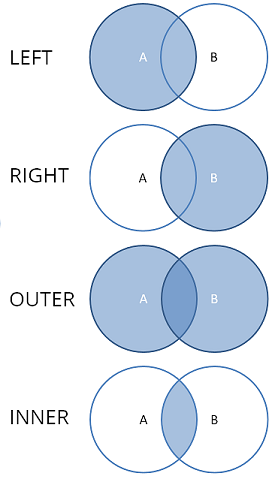
| Join type | Rows in the result |
|---|---|
inner | Only rows whose keys match in both tables |
outer | All rows of both tables. Missing values where a side has no match |
left | All rows of the left table, with the right table's values where they match |
right | All rows of the right table, with the left table's values where they match |
One-to-many joins
Key columns don't have to be unique. When a key value occurs in several rows of the right table, each matching row of the left table is repeated once per right row. A table of orders joined to a table of order lines thus produces one row per order line. The same applies the other way around.
Keys need to be unique only for in-place joins, and only on the side that doesn't receive the result.
In-place joins
A left or right join can be performed in place: the result replaces the
content of the left table (for a left join) or the right table (for a
right join), and no new table is created. This is useful for enrichment,
for example to add a few columns from a lookup table to a large table
without duplicating it.
Because the receiving table keeps its rows, the other table's keys must be unique. If they aren't, the dialog reports it and won't run the join.
Joining in the database
When both tables come from the same database, consider joining them in the database instead. The Visual Query Editor builds joins from foreign keys, letting the database perform the join before the data reaches Datagrok.
If the detail data is stored in a database, you may not need to load it at all. Database Explorer and data enrichment can fetch related records for the row you are viewing.
Joins and dashboards
An in-place join on a table that has a creation script is recorded as a step in that script and replays every time the dashboard opens with Data sync on. A join that creates a new table is done once.
Videos
Samples:
See also: